Wired interfaces
Integrate with the equipment.
CAN / J1939-based protocolsUARTRS485 / Modbus
Coordinate HMI commands, status information, and application functions with the equipment interfaces.

Custom display graphics, embedded firmware, and communication interfaces developed around the equipment. Connect what the user sees with what the product needs to do.
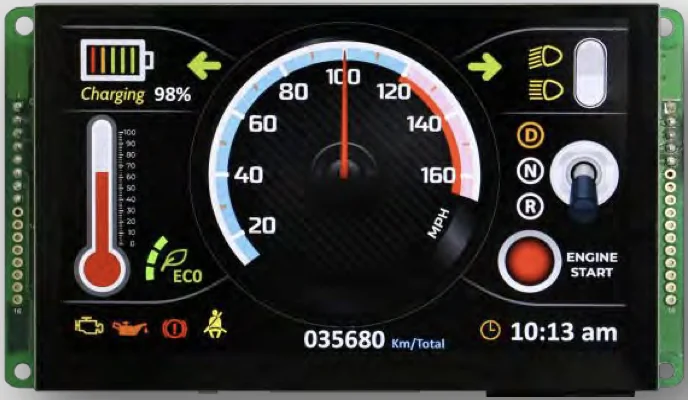
Explore the graphics and display examples in Theta’s supplied HMI presentation. Select a view and enlarge the original image.
Use visual hierarchy, status colors, and operating information to shape the product interface.
A shared-MCU architecture is one option described in the source material. Select the hardware around both interface and application requirements.
Conceptual diagram based on the HMI architecture described in the presentation. Processing resources, timing, memory, and EMC/EMI requirements are evaluated for each product.
Protocols listed in the supplied HMI material. Their use and implementation are selected for the target equipment.
Coordinate HMI commands, status information, and application functions with the equipment interfaces.
Evaluate connectivity, integration, and the communication requirements of the complete product.
Define the operating information, commands, alerts, and visual hierarchy the user needs. Theta’s supplied HMI material describes support for different display sizes and custom graphics.
The material lists experience with CAN and J1939-based protocols, UART, RS485/Modbus, 2.4 GHz Wi-Fi IEEE 802.11b/g/n, and Bluetooth 5 LE. Select the protocol around the equipment architecture and integration requirements.
HMI and application functions can share a microcontroller in an appropriate architecture. Evaluate graphics workload, memory, response time, communication, and application demands before selecting the platform.
Theta’s HMI material describes complete hardware design and EMC/EMI testing and validation experience. Product-specific testing and any required certification remain part of the agreed development scope.
Bring your requirements. Let’s explore the engineering together.